Posts

LeetCode 669 | Trim a Binary Search Tree | Python Solution

 Introduction: In this blog post, we'll discuss a common problem in binary search trees, which is trimming a tree within a given range. We'll go over a Python solution using recursion to accomplish this task. Problem Statement: Given a binary search tree (BST) with the root node, low, and high values, the task is to trim the tree such that all the nodes' values are within the range [low, high]. You can assume that the given tree is a non-empty BST and the range low <= high. Here's an example of a TreeNode class in Python that we'll be working with: # Definition for a binary tree node. # class TreeNode(object): # def __init__(self, val=0, left=None, right=None): # self.val = val # self.left = left # self.right = right class Solution ( object ): def trimBST ( self , root, low, high): """ :type root: TreeNode :type low: int :type high: int :rtype: TreeNode ...

LeetCode 2415 | Reverse Odd Levels of Binary Tree | Python Solution

Image
 LeetCode Problem Link : https://leetcode.com/problems/reverse-odd-levels-of-binary-tree/description/ Video Solution :  https://www.youtube.com/watch?v=oidCQx8j7GE # Definition for a binary tree node. # class TreeNode(object): # def __init__(self, val=0, left=None, right=None): # self.val = val # self.left = left # self.right = right class Solution ( object ): def reverseOddLevels ( self , root): """ :type root: Optional[TreeNode] :rtype: Optional[TreeNode] """ def helper (root1,root2, depth): if root1 is None and root2 is None : return None if depth % 2 != 0 : tmp = root1 . val root1 . val = root2 . val root2 . val = tmp helper(root1 . left,root2 . right, depth + 1 ) helper(root1 . right,root2 . left, depth + 1 ) helper(root . lef...

LeetCode - 1026 Maximum Difference Between Node and Ancestor | Python Solution

Image
LeetCode 1026 Python Solution  LeetCode : https://leetcode.com/problems/maximum-difference-between-node-and-ancestor/description/ # Definition for a binary tree node. # class TreeNode(object): # def __init__(self, val=0, left=None, right=None): # self.val = val # self.left = left # self.right = right class Solution(object): max_diff = 0 def maxAncestorDiff(self, root): """ :type root: TreeNode :rtype: int """ def helper(root , cmin , cmax): if root is None : return float( 'inf' ) ,float( '-inf' ) #Traverse Tree left_min , left_max = helper(root.left , cmin , cmax) right_min , right_max = helper(root.right , cmin ,cmax) cmin = min(root.val , left_min , right_min ) cmax= max(root.val , left_max , right_max ) self.max_diff = max(self.max_diff ...

LeetCode 662 | Maximum Width of Binary Tree | Python Solution

Image
 LeetCode Link : https://leetcode.com/problems/maximum-width-of-binary-tree/description/ Video Solution : https://www.youtube.com/watch?v=9NYXVzPCH04&t=2s # Definition for a binary tree node. # class TreeNode(object): # def __init__(self, val=0, left=None, right=None): # self.val = val # self.left = left # self.right = right class Solution(object): def widthOfBinaryTree(self, root : TreeNode) -> int: """ :type root: TreeNode :rtype: int """ width_map = defaultdict(list) def helper(root , depth , column): if root is None : return # Add column position to map # width_map[1] = [0,1] <- 0 for 3 and 1 for 2. width_map[depth].append(column) left_col = column* 2 # Calculate Left Column Position right_col = column* 2 + 1 # Calculate Righ...

LeetCode 687 Longest Univalue Path | Python Solution

 LeetCode : https://leetcode.com/problems/longest-univalue-path/ Youtube Solution :  Youtube Solution Link # Definition for a binary tree node. # class TreeNode(object): # def __init__(self, val=0, left=None, right=None): # self.val = val # self.left = left # self.right = right class Solution ( object ): longest_path = 0 def longestUnivaluePath ( self , root): """ :type root: TreeNode :rtype: int """ self . helper(root) return self . longest_path def helper ( self ,root) : if root is None : return 0 left = self . helper(root . left) right = self . helper(root . right) if root . left and root . left . val == root . val : left_path = 1 + left else : left_path = 0 if root . right and root . right . val == root . val: right_path = ...

LeetCode | Hard | 1932 Merge BSTs to Create Single BST | Python Solution

  Approach Indentify your root tree from where merging will being . Now from remaining trees , apply helper function to merge. If final tree is valid BST then return tree else return None. Youtube Link :  https://www.youtube.com/watch?v=3QC5L5W0Lhk # Definition for a binary tree node. # class TreeNode(object): # def __init__(self, val=0, left=None, right=None): # self.val = val # self.left = left # self.right = right class Solution(object): is_merged = False def canMerge(self, trees): """ :type trees: List[TreeNode] :rtype: TreeNode """ if len(trees) == 1 : return trees[ 0 ] #Find List of Leaf Nodes all_leaves_node = set() for tree in trees : if tree.left : all_leaves_node.add(tree.left.val) if tree.right : all_leaves_node.add(tree.right.val) # Find start ...

LeetCode : 1302 Deepest Leaves Sum | Depth First Search (DFS) Solution with Python

  LeetCode Problem : https://leetcode.com/problems/deepest-leaves-sum/description/ # Definition for a binary tree node. # class TreeNode(object): # def __init__(self, val=0, left=None, right=None): # self.val = val # self.left = left # self.right = right class Solution(object): height = 0 result = 0 def deepestLeavesSum(self, root): """ :type root: TreeNode :rtype: int """ self.helper(root, 1 ) return self.result def helper(self, root , depth ) : if root is None : return 0 # Check if it is a Leaf Node and Depth is greater than Heigh # Then update result variable if depth > self.height and root.left is None and root.right is None : self.height = depth self.result = root.val elif depth == self.height: # If nodes are at same depth then , ad...

LeetCode : 655 Print Binary Tree | Python with Depth First Search Solution

Image
  LeetCode : https://leetcode.com/problems/print-binary-tree/description/ YouTube Link :  # Definition for a binary tree node. # class TreeNode(object): # def __init__(self, val=0, left=None, right=None): # self.val = val # self.left = left # self.right = right class Solution(object): res = [] height = 0 def printTree(self, root): """ :type root: TreeNode :rtype: List[List[str]] """ # Find height of tree to determine 2D List dimensions height_of_tree = self.calculate_height(root) m = height_of_tree # Numbers of rows n = 2 **m - 1 # Number of Columns # Init 2D list with "" empty values res = [[ "" ]*n for _ in range(m)] # Init low and high values based on list size low = 0 high = n def helper ( root , rowCounter , low , high ): ...

Python 3 - How to manage Python Environment on Mac OS /Linux

Image
Hi All  Today we will see how can we can manage environment using Python Note : All below commands are executed in Python3 environment. Python environments are useful when you are working on multiple project and do not want your python dependencies of one project collide with other projects. 1. Create a new Environment  python3 -m venv my_project_environment 2. Activate Environment  Once environment is created you will need to activate environment in order to use it. source my_project_environment/bin/activate 3. Install Libraries in Environment  You can use pip to install libraries in activated environment or requirement.txt pip list pip install nltk 4. Deactivate Environment  Simply type deactivate to stop using python environment  deactivate Keep Learning , Keep Sharing ... !!!

LeetCode Problem 1041- Robot Bounded In Circle - Level - Medium

Image
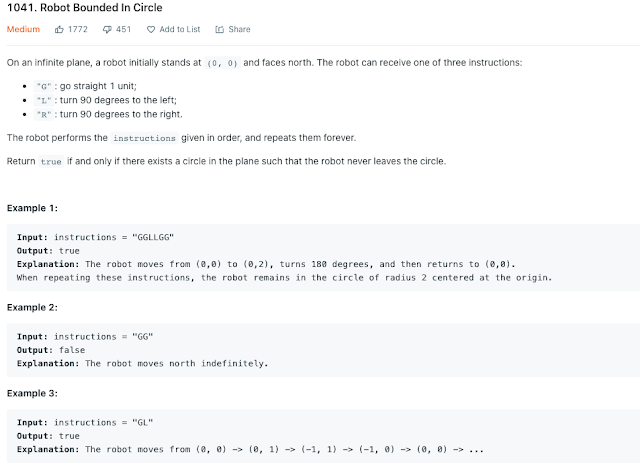
LeetCode 1041 - Robot Bounded In a Circle Today we are going to look at another LeetCode problem  1041 robot bounded in a circle with difficulty level medium. Problem Statement : From given problem statement , Robot can perform certain given sets of instruction either G,R,L and corresponding action can be taken. After performing instruction if robot come back to original position (0,0) that means robot will stay in circle and will never leave it. Let's understand more in details about behaviour of robot. Robot is standing at position (0,0) coordinates and facing North.  G >> Move One Step Ahead. That mens increment Y coordinate by One. R >> Rotate Robot to 90 degree right but stay there. L >> Rotate robot on left with 90.  Let's understand this problem by example given in problem statement. Command : GGLLGG Step 1 : First robot gets input at GG which means robot will move 2 step ahead by incrementing Y coordinates. So current position of robot will be ...

Leet Code Problem - 69 - Sqrt(x) - Difficulty Level : Easy

Image
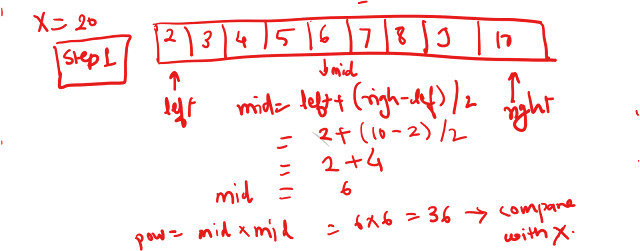
 Hello All, Welcome back to another algorithm challenge. Today we are going to look at LeetCode problem number 69 where you need to find square root of input number. Please find below link for detailed statement of problem. https://leetcode.com/problems/sqrtx/ Now if we read that problem statement , it's given that we can not use  pow(x, 0.5)  or  x ** 0.5. Now instead of focusing on calculating power root , we will focus on calculating square of number and we try to compare with input weather it matches or not. If my input greater is less than power we calculated , then again we loop find bigger square value. Now one approach to solve this problem is you start with number 1 and keep calculating square until you reach either equal or greater number than input provided. But this approach will increase my time complexity. Better approach would to use Binary Search algorithm approach which can give me result in O(logn) time. Algorithm : Let's looks at step by step appro...

LeetCode Problem 66 - Plus One - Algorithm and Java Solution

 Hi Friends, Today we are going to solve a leetcode problem number 66. Please feel free to read problem description from below link. https://leetcode.com/problems/plus-one/ In given problem , it states that you have a non-empty and non-negative array storing single digit value at each position and most significant bit is stored at head of list. Now we look at below example , when 1 is added to last digit 3 , it becomes 4 which would be simple to achieve. Input: digits = [1,2,3] Output: [1,2,4] Explanation: The array represents the integer 123. But problem comes when last digit is 9 where you add 1 , it becomes 2 digit number = 10 which is not allowed in array. So in that you have keep 0 at unit place and use carry 1 to be added in next digit. For Example  Input: digits = [1,2,9] Output: [1,3,0] Explanation: The array represents the integer 130. Now in above example , 1 added to 9 is replaced with 0 and carry got added to 2 became 3. Corner Case: Everything works fine exc...

Taints and Tolerations Example in Kubernetes

Image
Taints and Tolerations are advance scheduling mechanism designed to repel pods if they do not have matching toleration.  Pods are only accepted by Nodes if they match desired toleration otherwise Pods remains in Pending state or look for another nodes. In today's example , we will configure nodes and pods with taints and toleration respectively. We will make use of Minikube cluster for managing pods. Pre-requisite : Minikube Cluster  As you can see in above picture , we have two pod one with toleration defined and another without toleration. Since minikube is just one node cluster , we will use master node and apply taints on it. We will see pod scheduling behaviour when toleration applied versus toleration not applied. Let's make sure minikube cluster is running fine and check if master node has taints applied on it. kubectl describe nodes minikube | grep -i taints As you can currently no taints is applied on minikube master node , in this case any pod can be schedul...

Persistent Volume Example in Kubernetes - Stateful Application

Image
Welcome back on Kubernetes tutorial series. In today's tutorial , we will talk about using persistent volumes in kubernetes and a quick demo of setting up persistent volume on your local machine. Persistent volumes are useful for stateful application development where you always keep record of last information processed or maintain database transactional status.  We all know by default if your Pod re-starts then you loose current status of your application which may not be applicable in every scenario. In this example, we will provision PersistentVolume(PV) and PersistentVolumeClaim using default Storage class provisioned by hostPath. There are multiple types of Storage classes supported by Kubernetes. Complete list can be found by below link. https://kubernetes.io/docs/concepts/storage/storage-classes/ Github Location :  https://github.com/shashivish/kubernetes-example/tree/master/pvc-example Pre-requisite : Minikube Cluster On a high level , we will be following below task ...